There are many tips and tricks that can be applied to Windows XP in order to save or hide your private files. Some of these tricks require the use of certain softwares while some tricks require complex manipulation and heavy tweaking to your registry.
but this is a sweet and simple little trick that can help you make an invisible folder so you can save your private files inside it.
Here is how the trick goes:
1. Select the folder you want to make invisible
2. Right Click on the folder and click Rename and then remove the current name of the folder. Windows does not allow you to have a nameless folder so to fool windows use the Alt+0160 combination to generate an invisible name for your folder

3. Now again Right Click on the nameless folder and select Properties. Go to Customize tab and then click Change Icon
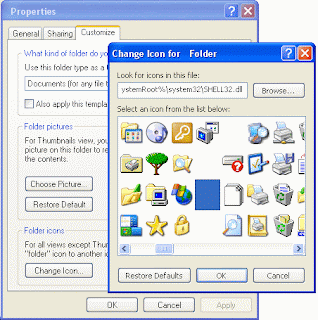
4. In the list of icons you will find 2-3 invisible icons. Select one of those invisible icons and press Ok and then again Ok. Congrats now you have an invisible folder

The most brilliant thing about this trick is that it only apparently makes your folder invisible thus blocking eye access to all files inside that folder and only you know where the folder is and can click on it any time just like you would on a normal Windows folder to see all the files hidden inside it